Install and open the HUD
Install LibAddonMenu-2.0 (revision 40 or later) and place the ZeraUI folder in Documents/Elder Scrolls Online/live/AddOns/. The manifest must be at AddOns/ZeraUI/ZeraUI.txt, not inside a second nested folder. Enable both addons at character select. In keyboard mode, open Settings → Addons → Zera UI or type /zeraset.
Starting in v1.1.0, Zera UI splits configuration into two focused workspaces backed by the same SavedVariables:
- Interactive HUD Editor (
Edit HUD): drag, resize, snap, align and live-style every HUD widget's fonts, sizes, spacing, layout and colors with full transactional Save / Cancel. - Settings panel (
/zeraset): 6 streamlined sections focused on module activations, gameplay & tracking behavior, filters, sounds, performance and tools.
Outside combat, preview sample timers, stacks, buffs, sets and meters with /zera preview; run it again to return to live values. Greyed-out options depend on a parent switch. Buff/debuff grids follow their own switches and do not modify ESO's Combat settings.
Quick workflows
- Move & style any widget live: Open Settings → Addons → Zera UI → Edit HUD (Interactive Editor). Click any widget on screen—or pick it from the HUD Elements list—to drag, corner-resize, nudge or customize its fonts, sizes and colors in the right-hand Inspector. Press Save to keep everything or Cancel to revert all position and visual edits.
- Corner timers & active bar arrow: In Edit HUD, select Action bar to adjust lower-left / lower-right timer fonts and offsets, or switch Active bar arrow style (Classic, Large, Left, Double) with instant preview.
- Resource bar modes & layouts: Switch Attribute bars (Off, Default Attribute Bar, Custom Attribute Bar) and layouts directly inside Edit HUD (HUD Overview, Inspector or right-click menu) or in 03 HUD widgets & performance → Resource bars.
- Custom skill timers: Run
/zera trackto open Skill Tracking (Studio). Pick a bar and skill, record an effect with the finder, assign its ID to the middle or either lower corner, test and save.
Interactive HUD Editor
Open Interactive Edit Mode from 01 General → Edit HUD (Interactive Editor) outside combat. Edit Mode controls are created lazily and hidden on exit, adding zero runtime cost during normal gameplay.
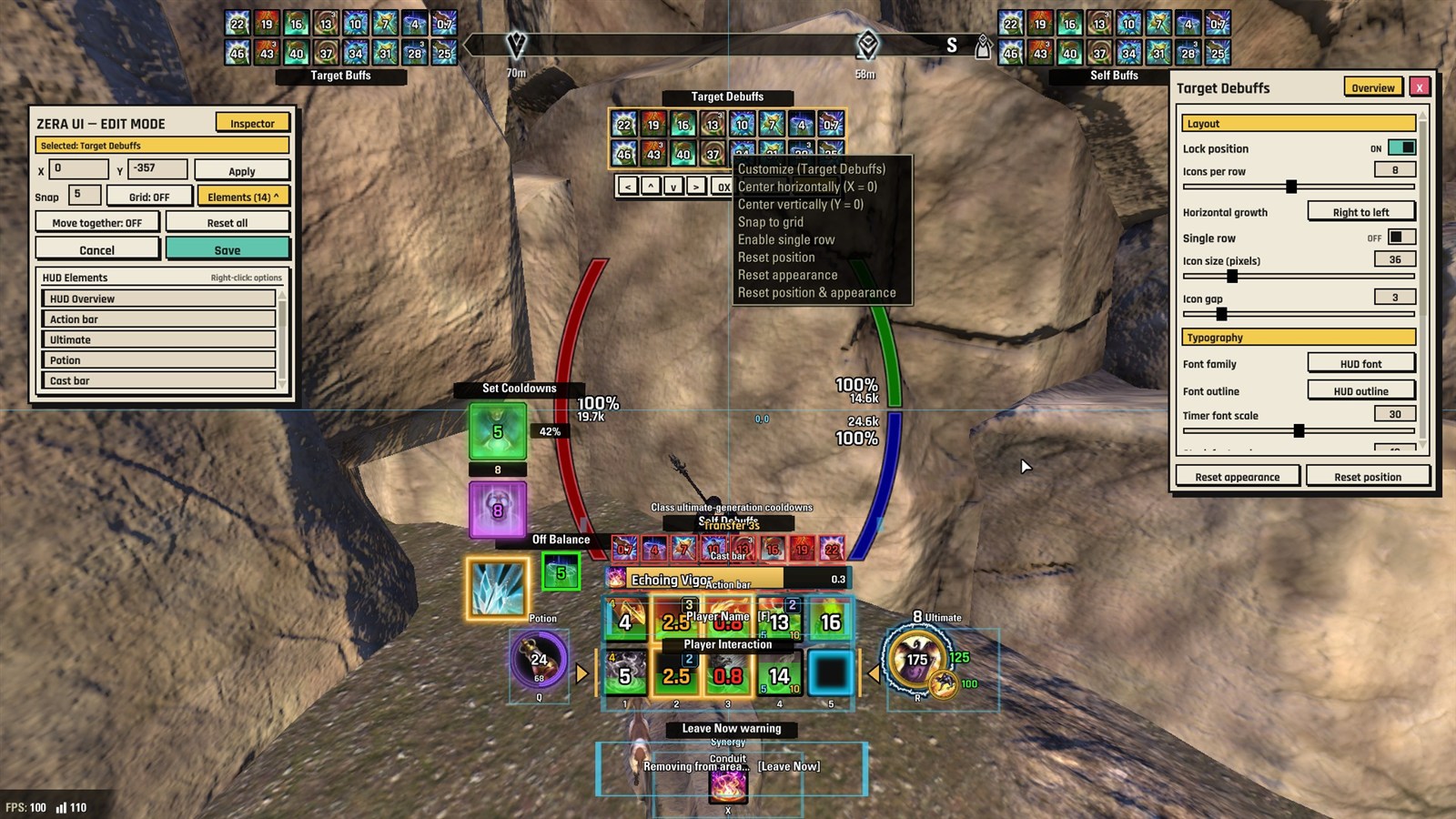
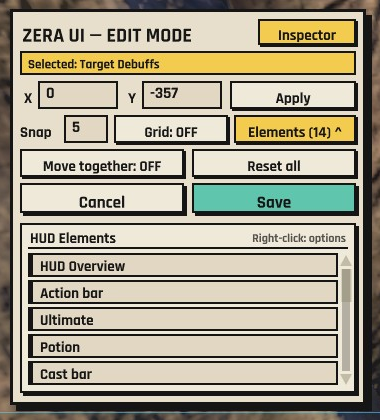 Edit Mode panel — X/Y coordinates, snap grid, Save/Cancel and collapsible HUD Elements list. |
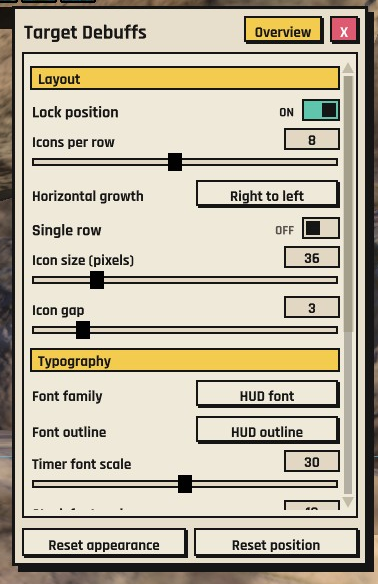 Live Inspector — edit the selected widget's layout, typography, visuals and colors in real time. |
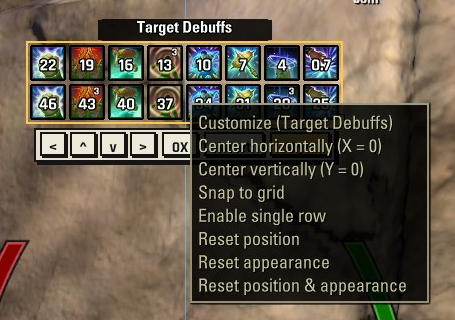 Nudge Bar & context menu — 1 px nudging, centering, grid snap and quick resets. |
Edit Mode panel & interactions
| Control / Action | What it does |
|---|---|
| HUD Elements list | Dynamic single-column scrollable list of all currently active HUD widgets (plus HUD Overview). Left-click selects the widget and opens its Inspector; right-click opens its context menu. Selecting a widget directly on screen keeps the list highlighted in sync. Collapse or expand anytime via Elements (N). |
| X / Y & Apply | Shows the selected widget's center offset from the middle of the screen. Type exact numbers and press Enter or Apply. |
| Snap & Grid: ON/OFF | Sets the drag snap step in pixels (0–64; 0 disables snapping) and toggles the visual alignment lattice. Screen-center magnetic guides also snap automatically unless Shift is held. |
| Floating Nudge Bar | Appears beside the selected widget: < ^ v > move by 1 px (hold Shift to move by Snap / 5 px), 0X centers horizontally, Reset resets position, and Style toggles the Inspector. |
| Corner resize grip | Drag the gold square at the bottom-right corner of scalable widgets (Action bar, Ultimate, Potion, Cast bar, Synergy, Attributes, Resource arcs, Set Cooldowns, Effect grids, Off Balance) to resize them directly. |
| Right-click context menu | Right-click any widget or list row for Customize, Center horizontally (X = 0), Center vertically (Y = 0), Snap to grid, widget-specific toggles (Attribute bar mode/layout/grouping, Set direction, Effect single row), and Reset position / appearance / both. |
| Move together / Reset all | Move together links main HUD elements so dragging one moves the whole HUD. Reset all restores every widget position after a two-click confirmation. |
| Save / Cancel | Save keeps all position and appearance edits and refreshes the Settings panel. Cancel rolls back every moved widget, slider, dropdown and color change made during the session. |
Live Inspector reference (per widget)
When no widget is selected (or after clicking Overview in the Inspector header), the Inspector displays HUD Overview. Clicking any widget switches the Inspector to that widget's live controls, with Reset appearance and Reset position in the footer.
| Widget | Editable controls in Live Inspector |
|---|---|
| HUD Overview (Global) | HUD scale (0.60–1.60), Attribute bars mode (Off / Default Attribute Bar / Custom Attribute Bar), global Font family, global Duration outline, Move HUD together (linked), Show alignment grid, Edit snap grid (0–64 px). |
| Action bar | Skill icon size (32–96), horizontal/vertical spacing, Active bar on top toggle, active bar arrow & style (Classic, Large, Left, Double), keybind labels & font size, inactive icon desaturation & opacity, duration font size & outline, warning colors, default/soon/final/second/third timer colors, lower-left & lower-right corner timer font sizes and X/Y offsets, stacks/charges/badges & colors, target count & auxiliary badge font sizes, green duration fill & color, glow/toggle/proc colors. |
| Attributes / Health / Magicka / Stamina | Attribute bars mode (Off / Default / Custom), Layout (Default: Pyramid / Native; Custom: Curved / Native / Stacked / Pyramid), Move attributes individually, bar scale (0.50–1.80), bar width (100–300), bar gap (0–20), Attribute font & outline, value format (Short / Full / Full / Max), Show percentage, text size (10–28), text vertical offset (-10 to 10). |
| Resource arcs (Curved) | Attribute bars mode & Layout switchers, Arc size (0.60–1.80), Space between arcs (250–800), Attribute font & outline, value format, Show percentage, Arc percentage size (10–30), Arc value size (8–26), Shield opacity (0.10–1.00). |
| Ultimate | Ultimate size (0.50–1.80), Overload style (Classic / Gapless bright core), points / cost / duration font sizes, ring / active ring / affordable cost / unaffordable cost colors. |
| Potion | Quickslot size (0.50–1.80), timer font size, potion count font size, potion count position (Inside bottom, Bottom, Top, Left, Top left, Top right), quickslot ring color. |
| Cast bar | GCD size (0.50–1.80), ability name font size, countdown font size, GCD fill tint, channel fill tint. |
| Synergy | Synergy size (0.50–1.80), show synergy name & key, name/key font sizes, Preview synergy appearance button. |
| Class ultimate-generation cooldowns | Class cooldown font size (0–40). |
| Set Cooldowns | Lock position, icon layout (Vertical / Horizontal), icon size (24–128), widget scale (0.50–2.00), icon spacing (0–40), font family & outline, countdown/stack/secondary/name font sizes, show stacks & counts, show set names / position / background, progress fill, glow effects, icon frame, desaturate cooldown/off-bar icons, state-colored timer/frame, full state & text color palette. |
| Self Buffs / Self Debuffs / Target Buffs / Target Debuffs | Lock position, icons per row (1–16), horizontal growth (Right to left / Left to right / Center), single row, icon size (20–100), icon gap (0–20), font family & outline, timer/stack font scales, show stacks, countdown fill, expiry flash & threshold, highlight debuffs (debuff grids), fill/highlight color. |
| Off Balance | Lock position, icon size (20–100), timer font scale (12–48), font family & outline, countdown fill, active / immunity / ready colors. |
Native ESO HUD movers (Player Interaction [F], Leave Now, Interact prompt [E], Tutorial tip, NPC Dialogue / Quest Accept) | Native ESO controls: drag, nudge, align or reset position in Edit Mode (locked automatically when managed by ESO's native HUD Editor); visual appearance stays managed by ESO. |
01 GENERAL
Top-level controls in Settings → Addons → Zera UI (/zeraset).
| Setting | What it does |
|---|---|
| Language / Dil | Switches the Zera UI settings menu and Edit Mode between English and Türkçe. Requires a UI reload. |
| Enable Zera UI | Master switch for the custom HUD and trackers. Turning it off restores original ESO controls where Zera UI owns them. |
| Edit HUD (Interactive Editor) | Opens Interactive Edit Mode to drag, snap, resize and live-style every widget with full Save/Cancel. |
| Toggle HUD preview | Displays sample timers, stacks, buffs, sets and meters outside combat. |
| Font family | Global default HUD font (Rajdhani Bold, Rajdhani SemiBold, Univers 67, Univers 57). Widgets set to HUD font inherit this choice. Missing .slug files fall back to Univers 67. |
| Duration outline | Global default text outline (thick-outline, outline, thin-outline, normal, shadow, soft-shadow-thin, soft-shadow-thick). Widgets set to HUD outline inherit this choice. |
| Reset appearance to defaults | Restores HUD colors, sizes, positioning and animations while keeping custom skill tracking rules intact. |
02 ACTION BAR & ANIMATIONS
Availability & timers
| Setting | What it does |
|---|---|
| Show skill tooltips | Display ESO skill tooltips when hovering action bar slots with the cursor visible. |
| Active bar on top | Automatically moves the active weapon bar to the top row on every weapon swap without rebinding slots; Werewolf and single-bar forms automatically center the skill row vertically between Q and R. |
| Darken unusable skills | Master switch for graying out unusable skills on the active bar, updated immediately on bar swap without a 300 ms flash. |
| Darken low-resource skills | Darkens skills whose Magicka or Stamina cost exceeds your current resource. |
| Darken corpse-required skills | Darkens Blastbones and corpse-consuming skills when ESO reports no corpse is available. |
| Darken skills without valid target | Darkens enemy-targeted skills when you have no valid attackable target or are out of range. |
| Soon / Last warning (seconds) | Thresholds (1–10 s and 0.5–5 s) at which timers shift to soon/final warning colors. |
| Show decimals below (seconds) | Shows tenths of a second below this threshold (0–10 s). |
| Debuff timers follow your target | Shows the DoT/debuff time remaining on the enemy you currently look at. Per skill, Skill Tracking can override to Soonest or Latest. |
| Keep the last target's timer when looking away | Continues counting down the last target's debuff timer when no enemy is under the crosshair. |
Animations & glows
| Setting | What it does |
|---|---|
| Gold cast / synergy animations | Master switch for HUD cast, expiry and synergy animations. |
| Skill cast flash / Pressed button effect / Weapon bar transition | Controls cast flash, pressed-button sink animation and smooth weapon-bar swap transitions. |
| Gold flash when an effect expires | Plays a brief gold flash when a tracked skill effect ends. |
| Gold border (loop near expiration / stack threshold / inactive bar) | Shows the rotating gold loop before expiration (0.5–10 s), when reaching the configured stack threshold (1–10), and optionally on the inactive bar. |
| Toggle & proc glow | Enables active edge glows and optional pulses for toggled skills (including Overload) and player proc highlights. Includes a Replay sample glow animations button. |
03 HUD WIDGETS & PERFORMANCE
Resource bars
Powered by the unified AttributeCore engine. Visual sizing, fonts, offsets and shield opacity are configured live in Edit HUD.
| Setting | What it does |
|---|---|
| Attribute bars | Off (ESO manages its own bars), Default Attribute Bar (ESO's bars arranged by Zera UI) or Custom Attribute Bar (Zera UI's own bars; ESO's bars and native warning animations are hidden and paused cleanly). |
| Layout | Default: Pyramid or Native. Custom: Curved, Native, Stacked or Pyramid. Switching layouts resets their position. |
| Show damage shield value | Displays remaining damage shield in blue beside health, e.g. 19.7k (8.4k) 100%. |
| Show trauma / Show no healing | Custom bars only: purple trauma marker on health and dark-red tint while healing is blocked. |
| Update rate | Custom bars only: controls redraw cadence during rapid value changes (Every change or rate-limited in large fights; final value is always shown). |
| Red text at 25% or lower | Turns health text red at or below 25% (all three resources on Curved arcs). |
Ultimate, potion, cast & synergy
| Setting | What it does |
|---|---|
| Ultimate options | Pulse when ultimate is ready, Metallic ring bloom, Show ultimate active duration, Show inactive ultimate, and Show ultimate costs (green when affordable, red otherwise). |
| Potion / quickslot | Show potion / quickslot meter — displays cooldown ring and remaining potion count. |
| Cast / channel / GCD bar | Show global cooldown bar (master switch), Show instant skill global cooldown, Show channeled abilities (Meditate shows elapsed time) and Show cast-time abilities. |
| Synergy | Show synergy alert, Synergy disappearance (Instant, Fade, Flash + fade) and Synergy key label. |
04 TRACKING & CLASS MECHANICS
Group buffs & target counts
| Setting | What it does |
|---|---|
| Show target count | Counts distinct enemies or friendly recipients of supported heals, shields and group buffs (excluding yourself). |
| Show count for one target / one group buff recipient | Controls whether a count of 1 is shown for ordinary targets or specifically for supported group buffs. |
| Group members only (friendly recipients) | Excludes non-group friendly players where ESO identifies group membership; enemy counts are unchanged. |
| Multi-target timer expiration | Follow either the Last to expire or First to expire recipient's duration without changing counts or stacks. |
| Multi-target blacklist skill | Hide the target counter for a specific slotted ability (saved by ability including Scribing scripts). |
Class mechanics
| Class / Scope | Settings & behavior |
|---|---|
| Vampire | Strike from the Shadows timer — displays the observed passive buff on Blood Frenzy and morphs while active. |
| Arcanist | Arcanist mastery timer location (Off, Fatecarver, Tentacular Dread, Both) — shows observed Abyssal Emergence (A) and Fate Realigned (F) durations. |
| Necromancer | Show Nothing Wasted timer, Nothing Wasted decay warning (gold loop even on inactive bar) and warning threshold (1–5 s). |
| Dragonknight | Landslide / Inexorable Descent on Whip (L) — displays the actual player buff stack independently of Seething Fury and Whip charges. |
| All classes | External heal application count (E on supported Vigor/Regeneration morphs) and Class ultimate-generation cooldowns above the action bar. Class mastery ownership stays automatically synced across subclassing and skill respecs. |
05 SETS
Automatically tracks complete gear sets on either weapon bar. Perfected variants resolve natively via GetItemSetUnperfectedSetId, No-Proc Cyrodiil suppression is detected via GetItemSetSuppressionInfo, and wearing Jorvuld's Guidance automatically scales Ultimate-duration sets and Roaring Opportunist by +40%. Customize icon layout, fonts and colors live in Edit HUD.
Set tracking & special mechanics
| Setting | What it does |
|---|---|
| Enable set cooldown tracker | Master switch for equipped set tracking. |
| Visibility & countdown | Show outside combat, Show ready set icons, Show off-bar set icons, Show cooldown during active effects, and Set decimal countdown threshold (0–10 s). |
| Set visual feedback | Golden loop when a set can proc (for cooldowns ≥ 3 s), Golden fade-out on set proc, Resource threshold glow (Coral Riptide, Bahsei's Mania, Martial Knowledge) and Toggle sample icons. |
| Z'en's Redress | Z'en: focus single boss (event-driven via EVENT_BOSSES_CHANGED) and Z'en: count method (All damage effects or Longer than 1 s). |
| Roaring Opportunist | Predicted duration (automatically accounts for Perfected ID and Jorvuld +40% on weapon swap) and Affected recipients. |
| Pearls / Esoteric | Resource percentage and Proc count toggles. |
Set filters, overrides & sounds
| Setting | What it does |
|---|---|
| Global sounds | Set proc sound and Set ready sound with built-in test buttons. |
| Individual sets | Filter mode (All equipped, Hide selected, Only selected), per-set filter toggle, per-set icon size, active/cooldown color overrides, and per-set proc/ready sounds. Normal and Perfected variants share preferences automatically. |
06 BUFFS, DEBUFFS & TOOLS
Buff & debuff tracking
Four independent buff/debuff grids (Self Buffs, Self Debuffs, Target Buffs, Target Debuffs) sharing one unit scan. Style columns, growth direction, single row, sizes, fonts and colors directly in Edit HUD.
| Setting | What it does |
|---|---|
| Global effect toggles | Long effects (> 60 s), Show effects outside combat, Hide matching native buff containers, and Preview enabled effect grids. |
| Per-area filters | Select an area (Self Buffs / Self Debuffs / Target Buffs / Target Debuffs) to configure Enable, Permanent effects, Sort order (Shortest first / Game order) and Only my selected target effects. |
| Hide & whitelist | Enable Mouse tooltips & right-click menu to right-click any live buff/debuff icon (with cursor shown) and blacklist or whitelist it. Or add/remove IDs and exact names directly in Settings and toggle per-grid whitelist-only mode. |
Off Balance tracker
| Setting | What it does |
|---|---|
| Off Balance options | Enable Off Balance icon, Exclude Off Balance from target grid, Show when Off Balance is ready, Estimate missing Off Balance immunity (15 s same-target fallback after natural expiry; never transfers across targets), Expiry flash and threshold (1–10 s). Icon size, font and colors live in Edit HUD. |
Per-skill animations & Skill Tracking (Studio)
| Tool | What it does |
|---|---|
| Per-skill animations & stack thresholds | Pick any Front/Back slot to override cast flash, expiration flash, gold loops, inactive-bar loop, stack threshold (1–30) and expiration warning (0.1–10 s). Saved by ability (including Scribing scripts) and refreshed automatically when Settings opens. |
Skill tracking & effect IDs (/zera track) | Opens Zera UI's Studio window to inspect built-in timers, record real combat effects with the Effect Finder, assign up to three timers (Middle, Lower left, Lower right) or Fake Effects, and manage or clear all custom tracking rules. |
| Reload UI | Reloads ESO's interface to apply reload-required changes such as menu language. |
Chat commands
/zeraui is an alias for /zera. For tracking commands, <bar> accepts front, back, active (or f, b, a); <slot> is 1–5. auto follows the observed effect with a fallback, cast uses a fixed cast duration, and effect uses the observed effect only.
| Command | Result |
|---|---|
/zeraset | Open the Zera UI settings panel. |
/zera | Print the command summary. |
/zera on · /zera off | Enable or disable Zera UI and sync ESO's native action bar timers. |
/zera replace | Toggle replacement of ESO's original action bar; casting and keybindings still work. |
/zera preview | Toggle sample HUD values outside combat. |
/zera animations | Toggle the master HUD animation switch. |
/zera scale <number> | Set overall HUD scale (0.5–1.6). Example: /zera scale 0.9. |
/zera y <number> | Set the main HUD's vertical offset relative to the bottom anchor; negative moves up. |
/zera track · /zera tracking · /zera finder | Open the Skill Tracking Studio window and effect finder. |
/zera ids | List skills on both bars, their ability IDs and active custom tracking rule. |
/zera track <bar> <slot> martial | Apply the Martial preset (effect 217353, 5 s fallback). |
/zera track <bar> <slot> status | Apply the Status preset (effect 217358, 10 s fallback). |
/zera track <bar> <slot> <effectID> <seconds> [mode] | Save a custom main timer rule. Example: /zera track front 2 217353 5 auto. |
/zera untrack <bar> <slot> | Remove custom timer rules for that skill and restore automatic tracking. |
/zera sets | List supported equipped sets and tracker status. |
/zera sets on · /zera sets off | Enable or disable the set cooldown tracker widget. |
/zera sets preview | Toggle sample set icons (also enables the set tracker). |
/zera sets refresh | Rescan equipped sets and report the result. |
/zera sets gear | Print front/back piece counts, canonical set IDs and status (TRACKABLE, SUPPRESSED in No-Proc Cyrodiil, etc.). |
/zera sets zen | Report the scanned Z'en target, mark state and effects counted under each method. |
/zera sets probe · /zera sets probe stop | Start or stop the 30-second combat event probe for learning Merciless Charge or Corpseburster IDs. |
/zera attributes | Print current resource-bar engine integration status. |